

Written by Shubh Chakrabarty
How to Stop Form Spam Securing WordPress Endpoints
If you manage a high-traffic WordPress website, you already know the frustration. You install a top-tier security layer like Cloudflare, enable a modern CAPTCHA alternative like Turnstile, and assume your contact forms are safe.
But then, the spam keeps rolling in.
Recently, we encountered exactly this scenario. A client was utilizing Cloudflare Turnstile to protect their site, yet they were still receiving dozens of automated spam submissions every month. On the surface, the security perimeter looked flawless. The “Verify you are human” challenge was active, and bot fight modes were engaged.
So, how were the bots slipping through? The answer lies in the difference between a visual deterrent and true server-side endpoint security. Here is how we audited their architecture, identified the vulnerabilities, and secured their web forms.
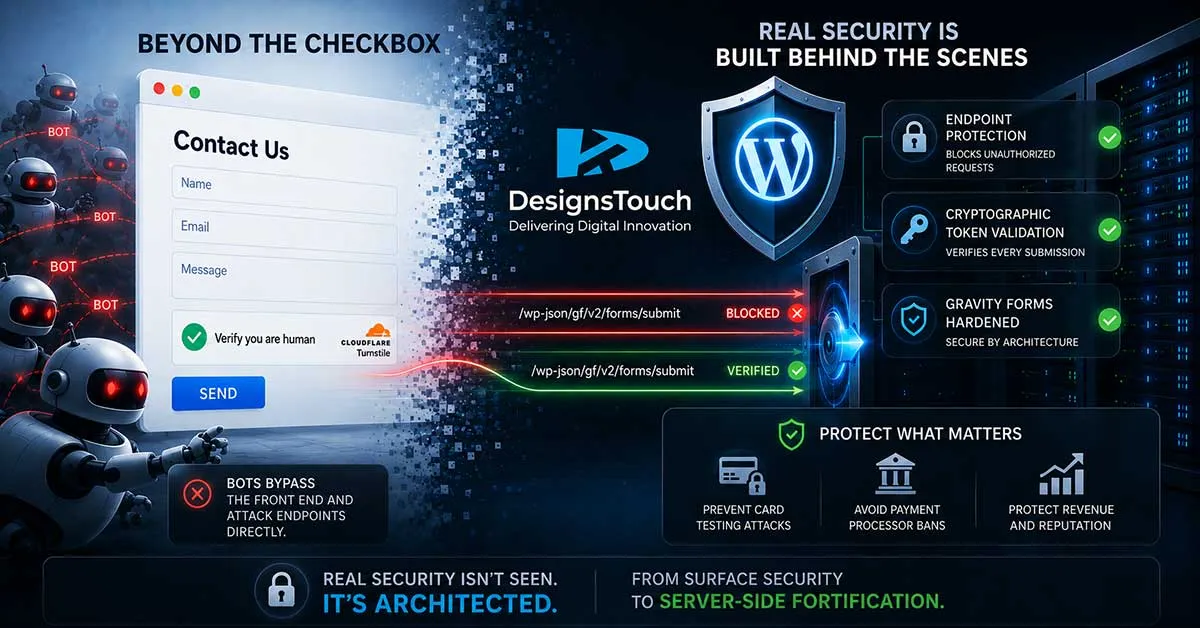
The Illusion of Front-End Security
Modern spam bots are incredibly efficient. When they target a website, they rarely load the page in a standard web browser like a human would. This means they never actually “see” your website’s design, your carefully placed submit buttons, or your visual CAPTCHA widgets.
Instead, they scan the site’s code to find the exact processing URL (the endpoint) that handles form submissions. Once they find it, they bypass the front-end entirely and send their payload (the spam message) directly to your server.
If your website relies solely on the front-end widget to stop bots, but the backend server isn’t explicitly configured to require and validate a security token before processing the data, the bots will walk right through the back door.
The Gravity Forms Disconnect
During our security sweep, we identified that the site relied on Gravity Forms. The original Turnstile integration was configured at the global account level—the API keys were correctly input into the main WordPress dashboard.
However, entering API keys globally does not inherently secure every form on the site.
To achieve true server-side validation with Gravity Forms, the Turnstile module must be physically injected into the architecture of every single active form. Without this, the form operates on an honor system, which automated scripts are built to exploit.
Securing the “Forgotten” Doors
When auditing a site for vulnerabilities, you have to think like a scraper bot. Bots do not care which form is your “Main Contact Form.” They will systematically crawl your sitemap to find any unprotected entry point.
In this case, the main contact page was partially protected, but the site had nearly 20 other active endpoints—including old landing-page forms, secondary inquiry fields, and newsletter sign-ups. These secondary forms were entirely unprotected, acting as massive spam magnets.
Our Remediation Strategy:
- Comprehensive Endpoint Audit: We mapped out every single form ID processing data on the domain to isolate the active targets.
- Token Enforcement: We manually injected the Turnstile validation sequence into every vulnerable form, ensuring that Gravity Forms would halt any submission that lacked a cryptographically verified token from Cloudflare.
- Honeypot Deployment: For less critical endpoints, we enabled anti-spam honeypots—hidden fields invisible to real users but immediately flagged when filled by scraping bots.
The Hidden Danger: Card Testing Attacks
One of the most critical discoveries during this audit was that several unprotected forms were tied to payment gateways.
When bots find an unprotected payment form, they often launch “card testing attacks.” They rapidly submit thousands of stolen credit card numbers to see which ones are successfully charged. If this happens, your payment processor (like Stripe or PayPal) can flag your account for fraud and shut down your ability to process transactions.
By enforcing Turnstile validation on the payment forms before the processor is ever pinged, we neutralized the threat of card testing entirely.
The Takeaway
Web security is never a “set it and forget it” solution. A tool is only as effective as its integration.
By auditing the entire site architecture rather than applying a surface-level patch, we moved the client’s security from a visual illusion to a mathematically enforced barrier, reducing automated spam traffic to zero.
Why does WordPress form spam happen even with CAPTCHA enabled?
Many spam bots bypass the website front end entirely and send requests directly to backend form-processing endpoints. Without proper server-side validation, CAPTCHA alone may not stop automated submissions.
What is server-side endpoint validation in WordPress?
Server-side validation ensures that form submissions are verified on the backend before being processed. This prevents bots from bypassing front-end security tools like CAPTCHA or Turnstile widgets.
Can Gravity Forms be vulnerable to spam attacks?
Yes. If Cloudflare Turnstile or CAPTCHA is not properly integrated into every active Gravity Form with backend token enforcement, bots can exploit unprotected endpoints.
What are card testing attacks on WordPress websites?
Card testing attacks occur when bots rapidly submit stolen credit card numbers through vulnerable payment forms to identify valid cards. This can lead to fraud flags, chargebacks, and payment processor account suspensions.
How can Cloudflare Turnstile help secure WordPress forms?
When properly configured with backend token validation, Cloudflare Turnstile helps block automated bots and prevent spam submissions before the form data reaches the server or payment gateway.
Related Articles

Nonprofit Social Media Marketing: How Strategic Social Media Management Helps Nonprofits Increase Awareness, Donations, and Community Impact
Why Social Media Matters More Than Ever for NonprofitsNonprofits...

Website Redesign Mistakes Architecture Firms Make That Hurt SEO, Visibility, and Lead Generation
Architecture Firm Website Redesign Mistakes That Quietly Hurt SEO...

10 Clear Signs Your Website Needs SEO Services in 2026
10 Signs Your Website Needs SEO ServicesA website should be more...








Racine, Wisconsin
DesignsTouch
201 Sixth Street, Ste 401
Racine, Wisconsin 53403
Send us an email
info@designstouch.com
Milwaukee, Wisconsin
DesignsTouch
930 E Knapp St. #25
Milwaukee, WI 53202
414.928.5111