

Written by Shubh Chakrabarty
WordPress Supply Chain Attack (April 2026): How We Caught It and How to Fix It
The April 2026 WordPress supply chain attack compromised plugins and installed hidden backdoors on websites. Fixing it requires manual server cleanup, removal of malicious files, credential rotation, and running deep security scans beyond standard WordPress updates.
If you logged in to your WordPress dashboard recently and saw a stark warning that read, “Important Notice from the WordPress.org Plugins Team,” you aren’t alone. Early this April, the WordPress ecosystem was hit by a massive “supply chain attack.”
Malicious actors hijacked dozens of legitimate plugins—including those from the “essentialplugin” developer and tools like “WP Advanced Math Captcha” — and pushed updates containing hidden backdoors to thousands of websites.
At DesignsTouch, we monitor our clients’ infrastructure relentlessly. When the alerts started flashing, we immediately jumped into incident response mode. Here is a look at how we handled the fallout, why the automated WordPress patches aren’t enough, and the exact steps you must take to ensure your server is truly clean.
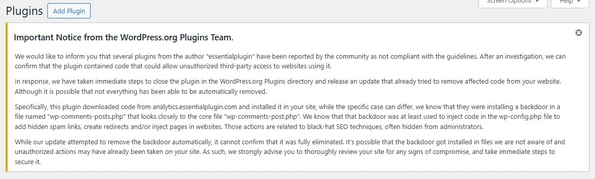
The Discovery: Why the Auto-Update Fails to Clear the Malware
The WordPress.org security team responded quickly by forcing an automatic update to affected sites. This update stripped the malicious code from the plugins themselves, stopping the immediate spread.
However, during our server-level audits, we discovered a critical flaw in relying solely on this automated patch: it leaves the backdoors behind.
The hackers had already executed their payloads. They dropped remote management tools and fake core files directly onto the servers. If web admins read the warning and assume WordPress fixed it, their servers remain wide open to attackers.
Step-by-Step: Our WordPress Malware Remediation Playbook
To fully lock down compromised environments, we executed a deep-cleaning protocol. If your site was running one of the compromised plugins, you need to manually perform these steps via your hosting provider’s File Manager or SFTP:
1. Hunt Down the Backdoor Files
The hackers used these plugins to drop files that act as remote controls. You need to search your server root and wp-content/plugins directories for these specific intruders:
- The Fake Core File: Look for wp-comments-posts.php (notice the plural “posts”). Delete it immediately. (Note: Do not delete wp-comments-post.php singular, which is a legitimate WordPress core file.
- The Remote Management Tool: Delete php if it exists in your root directory.
- The Data Payloads: Delete wp-math-captcha.dat and wp-math-captcha.dat.tmp.
2. Nuke the Compromised Plugin Folders
Even with the auto-update, you cannot trust the compromised plugin folders. Navigate to wp-content/plugins/ and entirely delete the directories for the affected plugins (such as essentialplugin or wp-advanced-math-captcha). You can replace their functionality with safer, modern alternatives later.
3. Sanitize wp-config.php and Rotate Passwords (Crucial)
Because the attackers had remote access, you must assume your database credentials are compromised.
- Open your wp-config.php file and audit it for hidden spam links or random-looking base64 code injections.
- Log in to your hosting dashboard and change your MySQL database password.
- Immediately update the DB_PASSWORD in your wp-config.php file to match the new credentials.
4. Audit for Ghost Administrators
Hackers often create silent Admin accounts to ensure they can get back in later. Go to Users > All Users in your WordPress dashboard and ruthlessly delete any administrator accounts you do not recognize.
5. Run a High-Sensitivity Deep Scan
Finally, utilize an enterprise-grade security scanner like Wordfence to sweep the server. Enable High Sensitivity and ensure the scanner is set to check files outside the standard WordPress installation to catch any lingering scripts.
Staying Vigilant
Supply chain attacks are terrifying because they turn the tools we trust against us. This recent attack is a stark reminder that installing a plugin is essentially handing over the keys to your server.
At DesignsTouch, security isn’t a “set it and forget it” task. It requires active monitoring, server-level expertise, and the ability to look past the dashboard warnings to get your hands dirty in the code.
If this recent wave of malware has impacted your site and you need expert remediation, contact our WordPress security team now! Contact DesignsTouch
Related Articles

Website Redesign Mistakes Architecture Firms Make That Hurt SEO, Visibility, and Lead Generation
Architecture Firm Website Redesign Mistakes That Quietly Hurt SEO...

10 Clear Signs Your Website Needs SEO Services in 2026
10 Signs Your Website Needs SEO ServicesA website should be more...
Beyond the Checkbox: How We Stopped Advanced Form Spam by Securing WordPress Endpoints
Modern spam bots no longer interact with WordPress websites as human users do. Instead, they target backend form-processing endpoints directly, bypassing front-end CAPTCHA tools entirely. In this article, we explain how we audited vulnerable Gravity Forms integrations, enforced Cloudflare Turnstile validation across all active endpoints, implemented honeypot protection, and eliminated advanced spam and card-testing attacks through a robust server-side security architecture.








Racine, Wisconsin
DesignsTouch
201 Sixth Street, Ste 401
Racine, Wisconsin 53403
Send us an email
info@designstouch.com
Milwaukee, Wisconsin
DesignsTouch
930 E Knapp St. #25
Milwaukee, WI 53202
414.928.5111